Blue Glow Neon: Creating Eye-Catching Text Effects for Modern Design
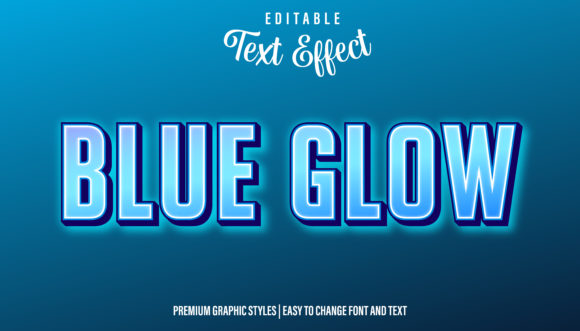
There’s a specific kind of magic that happens when you see neon lighting against a dark background. It’s immediate, it’s vibrant, and it demands attention. For designers and content creators, capturing that electric energy in digital work can be a game-changer. The Blue Glow Neon Graphic Style Text Effect isn’t just another decorative option; it’s a tool for injecting instant atmosphere and high-impact visual appeal into a wide range of projects, from YouTube thumbnails to event invitations.
The Versatility of a Luminous Style
What makes this particular effect so compelling is its blend of boldness and clarity. The blue glow evokes a sense of technology, energy, and cool confidence. Unlike a flat color, the layered glow creates depth, making text or shapes appear to float off the page or screen. This isn't just about making things "pop"; it's about creating a specific mood. Think about the sleek interface of a futuristic app, the electrifying title of a video game, or the standout header for a tech blog. This style delivers that instant, recognizable aesthetic.
Its practicality is where it truly shines for professionals. Applying the effect is designed to be seamless. By dragging the graphic style directly into your Adobe Illustrator's appearance panel, you can instantly apply this luminous look to any logo, text block, shape, or line. This ease of use is critical for maintaining workflow efficiency. Need to adjust the message? Simply select the text and change the word or font; the stunning blue glow effect remains perfectly intact, preserving your design's integrity while saving precious time.
Practical Applications Across Creative Fields
Let’s break down where this effect can be most effectively deployed. For branding and logo design, a neon style can communicate innovation and a forward-thinking attitude, perfect for startups in the tech, entertainment, or lifestyle sectors. Imagine a podcast cover or a streaming channel banner that uses this effect for its name—it immediately sets a tone of excitement and professionalism.
In the realm of social media graphics and digital marketing, standing out is non-negotiable. This effect is a powerhouse for creating scroll-stopping content. Use it for:
- YouTube thumbnails and video titles to increase click-through rates.
- Instagram story highlights and post headers to create a cohesive, vibrant feed.
- Event promotion graphics for concerts, webinars, or sales, where grabbing attention quickly is key.
For editorial and web design, it can be used strategically to highlight key elements. A subheading in a neon glow can break up long-form content on a blog, drawing the reader’s eye to important sections. On a website, it could be applied to call-to-action buttons or pricing tables to guide user focus without relying on generic, overused design tropes.
Integrating the Effect into Your Design Workflow
Adopting a new graphic style is about more than just its look; it's about how it fits into your process and enhances your project's goals. When considering the Blue Glow Neon Graphic Style, think about the font pairing. The effect works best with clean, bold sans-serif fonts that can support the glow without becoming illegible. A heavy, geometric typeface will hold the effect beautifully, while a highly decorative script might get lost. Always test your chosen font with the effect applied at the actual size it will be viewed to ensure readability.
Consistency is another major benefit. Once you apply the style, it becomes a reusable asset in your Illustrator library. This ensures that every time you need that neon look—whether for a series of social media posts or a suite of marketing materials—you get the exact same professional result. This visual consistency is fundamental to building a strong brand identity and making your work instantly recognizable.
Smart Design Choices and Final Thoughts
While the effect is visually striking, context is everything. It’s a display font style at heart, meaning it’s designed for headlines, logos, and short bursts of impactful text. Using it for long paragraphs would compromise readability. Its strength lies in creating focal points. Consider using it for your main headline, then pair it with a simple, legible sans-serif font for body copy to create a balanced and professional layout.
Before finalizing any commercial project, always review the licensing terms of the asset to ensure it covers your intended use, whether for digital products, merchandise, or client work. The Blue Glow Neon Graphic Style Text Effect is more than a decorative filter; it’s a versatile design asset that can solve specific communication challenges. It helps you capture attention in crowded digital spaces, inject energy into your projects, and present your content with a polished, modern edge. By applying it thoughtfully, you turn a simple piece of text into a memorable visual statement.