Typography Stories V2: Creating Impactful Text Animations
There is a specific kind of visual fatigue that happens when you are scrolling through Instagram stories. You swipe through blurry photos, shaky videos, and text overlays that are nearly impossible to read. Then, suddenly, you stop. It’s usually a solid color background with crisp, animated text that snaps into place with a satisfying rhythm. It looks expensive, it looks intentional, and it makes you pay attention to the message. That level of polish used to require hours in After Effects or hiring a motion designer, but the landscape of content creation has shifted. For those of us managing brands, running small businesses, or creating content daily, the ability to produce that "stop-scrolling" moment is now accessible right inside Premiere Pro.
The Shift from Static Text to Motion Typography
We are living in an era where static imagery is often not enough to hold attention, especially on platforms like Instagram where the "Stories" format dominates. However, not everyone has the time to master complex animation software. This is where the concept of "Typography Stories" becomes a game-changer. It isn't just about putting words on a screen; it’s about using motion graphics templates (MOGRTs) to give those words personality and weight.
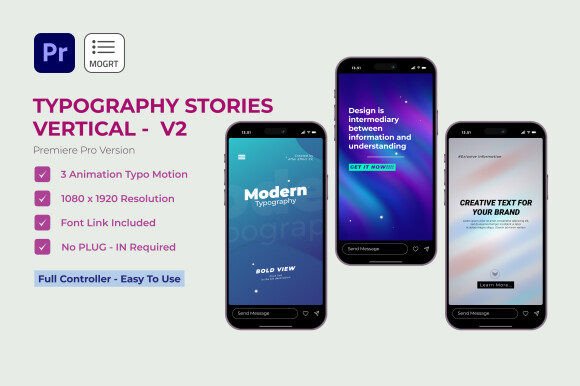
The "Typography Stories V2" package for Premiere Pro is designed to bridge the gap between professional motion design and the daily workflow of a content creator. Imagine you are a small business owner launching a flash sale. You don't need a cinematic video; you need three slides of text that pop up with energy, use your brand colors, and tell people exactly what to do. By using a pre-designed MOGRT, you are essentially hiring a motion designer for the cost of a template, but you retain full control over the customization.
Why Visual Consistency Matters More Than Ever
One of the biggest hurdles in branding is consistency. We often talk about color palettes and logos, but we rarely discuss "motion consistency." How does your brand move? Does it feel energetic and bouncy, or sleek and corporate? When you use a resource like Typography Stories V2, you aren't just getting text; you are getting a cohesive visual language.
Because the templates are designed to work together, you can ensure that your Monday motivation post looks like it belongs to the same brand as your Friday product reveal. This subtle repetition builds trust. When your audience sees those specific text animations, they start to recognize your content before they even read the logo. It transforms your social media graphics from random posts into a curated digital magazine.
Practical Application: Beyond the Instagram Feed
While the name suggests a focus on Instagram, the utility of high-quality typography templates extends much further. Think about the other assets a business needs. If you are a blogger, you might need a quick animated header for a YouTube video or a visual aid for a digital presentation. If you are in packaging design, you might need to create a mock-up video to show a client how the text looks in motion on a digital billboard.
Here is where the flexibility of a tool like this shines. Because it works within Premiere Pro, it fits into the standard video editing workflow that many creatives already use. You aren't forced to learn a new interface. You can drag and drop these templates onto your timeline, change the text to fit your editorial layout, and export. It is particularly useful for:
- Digital Products: Creating promotional videos for online courses or eBooks.
- Event Invitations: Sending out animated "Save the Date" clips via DM or email.
- Marketing Assets: Quick lower-thirds for webinar recordings or podcast clips.
- Merchandise Teasers: Highlighting new apparel drops with text that feels physical and tactile.
The Anatomy of the Design: What Makes It Work?
Let’s look closer at what makes a template pack like this effective from a design perspective. The inclusion of "customizable colors and fonts" is the headline feature, but the real value lies in the animation curves and the layout.
Good typography in motion isn't just about movement; it's about timing. A heavy serif font might need a slower, more deliberate entrance to feel authoritative, while a modern sans serif font might snap in quickly to feel tech-savvy. The "Typography Stories V2" templates are pre-timed to feel rhythmic. This is crucial for readability. If text animates too fast, the viewer misses the message. If it’s too slow, they swipe away. Professional templates solve this timing puzzle for you.
Furthermore, the ability to use "any font" is a massive advantage for brand identity. You aren't locked into a generic typeface that every other user of the template will use. If your brand identity relies on a specific premium font or a quirky handwritten font, you can swap it in immediately. This ensures that even though you are using a template, the end result looks unique to your brand.
Making Smart Typography Choices
Even with the best tools, the success of your design relies on the choices you make. When you open up a template like this, resist the urge to over-complicate things. Here are a few practical tips for getting the most out of these assets:
- Contrast is King: When selecting your background color and text color, ensure there is high contrast. If you are using a bright, energetic background, stick to white or black text for maximum readability. Don't make your audience squint.
- Font Pairing: If the template allows for multiple lines of text, consider how the fonts interact. A common strategy is pairing a bold, heavy display font for the headline with a lighter, clean sans serif for the details. This creates a hierarchy that guides the eye.
- Less is More: Just because you have space for 20 words doesn't mean you should use them. These templates are designed for impact. Use short, punchy headlines. Let the animation do the heavy lifting to keep the viewer engaged.
- Review the Styles: Look at the different story variations provided. One might be better suited for a "Sale" announcement, while another feels more editorial and sophisticated. Match the style to the specific goal of that post.
Efficiency in the Creative Workflow
For the entrepreneur or solo creator, time is the most valuable currency. Spending four hours trying to keyframe a text bounce in After Effects is rarely a good return on investment when you have a business to run. This is the ultimate practical value of a "User-Friendly MOGRT." It allows you to punch above your weight class visually without the associated time cost.
You can batch-create your content for the week in an afternoon. Set up your brand colors once, save them as a preset if the template allows, and then simply update the text for each day's theme. This workflow ensures you are consistent, professional, and present on social media without it consuming your entire day. It turns design from a bottleneck into a streamlined process.
Final Thoughts on Elevating Your Visuals
In a crowded digital marketplace, the details matter. The way text enters the screen, the font you choose to represent your voice, and the colors that define your mood all contribute to how your audience perceives your professionalism. Using high-quality motion graphics templates isn't a shortcut; it's a smart strategy. It allows you to leverage professional design principles to enhance your storytelling, ensuring that your message isn't just seen, but felt. Whether you are revamping your Instagram presence or creating assets for a new product launch, having a reliable toolkit of typography animations is an investment in your brand's visual future.